
I recently launched some changes to my company's design system code base to make the documentation more AI readable. This was a focused, practical change that is already having tangible results.
As a design system lead, I spend a lot of time and effort discussing, collecting, documenting, and disseminating our design decisions. But product teams using the design system have a lot on their plate. It's easy for these decisions to get lost and not make it into the work. It's frustrating, but I get it. People are busy, and there are so many little details to remember.
Part of my job is to continually test and refine our design system to make it work better for my team. I identified a problem. The documentation isn't meeting people where they are. But I wasn't sure of the best way to address this.
At the same time, my company has been very enthusiastic about using AI. We all have Claude accounts. The product designers are making Claude Code prototypes, and the engineers are using Claude Code to speed up development time. (I'll be using Claude in my examples, but this works with other AI models as well.) My goal is for our design system to be an integral part of this process. Plus I have been looking for productive ways to leverage AI myself to make our design system better.
As part of my effort to evaluate and improve our current documentation, I went around to all the consuming product teams for a listening session. We have Storybook set up to document the component library, as well as some additional documentation in Figma and Zeroheight. Some people mentioned checking Storybook. But the majority of people said that when they had a question about the design system, they asked Claude directly. I do that too, particularly for stress cases. “Hey Claude, can the button component support a badge, or will that take additional work?”
This feedback was clarifying. While I want to make sure that we have human readable documentation available for people if they have questions, this emphasized that we also need accurate documentation available for Claudes too. So then the next question is, how AI readable is our documentation?
Our Storybook is part of our design system code repository, and that repo is imported into all 50+ front end product repos that use the system. So that code is already available to the consuming systems. Zeroheight does have a Model Context Protocol (MCP), which lets you connect your Zeroheight documentation to Claude, but we don't have that feature with our account. Based on the feedback and our current resources and setup, it seemed like the best course of action was to move everything into Storybook. That's where people were already going and where Claudes already had access.
So I know that my design system code base is already being imported into the consuming repos. If an engineer working on a consuming product asks her Claude to use the design system, what exactly can that consuming Claude see from the system? I wasn't exactly sure. I've been hearing that it's important to make your code AI readable, but how do I go about doing that? ¯\_(ツ)_/¯
System Audit
I am currently taking the AI & Design Systems course from Brad Frost, Ian Frost, and TJ Pitre. There is a whole chapter on running an AI design system audit through your code base. The idea is to leverage AI to assess your system and find things that would be hard for a human to catch. Wow this audit was helpful! It gave me a practical and focused list of issues and how to fix them. The audit flagged items like naming inconsistencies, accessibility issues, and coverage gaps. And one of the big findings it came back with was that my design system repo wasn't very readable to consuming Claudes. Yikes. That section scored a 4/10. So even though the code base was being imported to consuming repos, they couldn't read everything in it. The documentation wasn't set up correctly to be machine readable.
Well, this was very helpful information. The audit laid out some needed steps to address this. What I liked about this process was that I was able to use Claude to write its own documentation. It understands what kind of documentation it needs and what format it needs to be written in. I did not need to come up with that part of the plan myself. My contribution was in asking a lot of questions and setting down some goals. We were able to shape the plan together.
Rebecca's Rule #1: The documentation needs to be machine readable and human readable. Claude knows how to set everything up to be accessible for consuming Claudes. While I think that will be the most common use case, it was important to me that all this documentation is also available for people to read too.
Rebecca's Rule #2: Update things in one place only. Claude gave me a lot of feedback on the best machine readable format to give to the consuming Claudes. It wasn't a human readable format, and I absolutely did not want to have to update information in two different places. This documentation needs to be maintainable for the long run. So we needed a system where the update happens in one file, and then the machine readable file gets automatically generated from that one source of truth.
What I Added to the System
The end result is that our documentation now lives in the design system code base itself, which includes Storybook. There are a few different places where decisions are recorded:
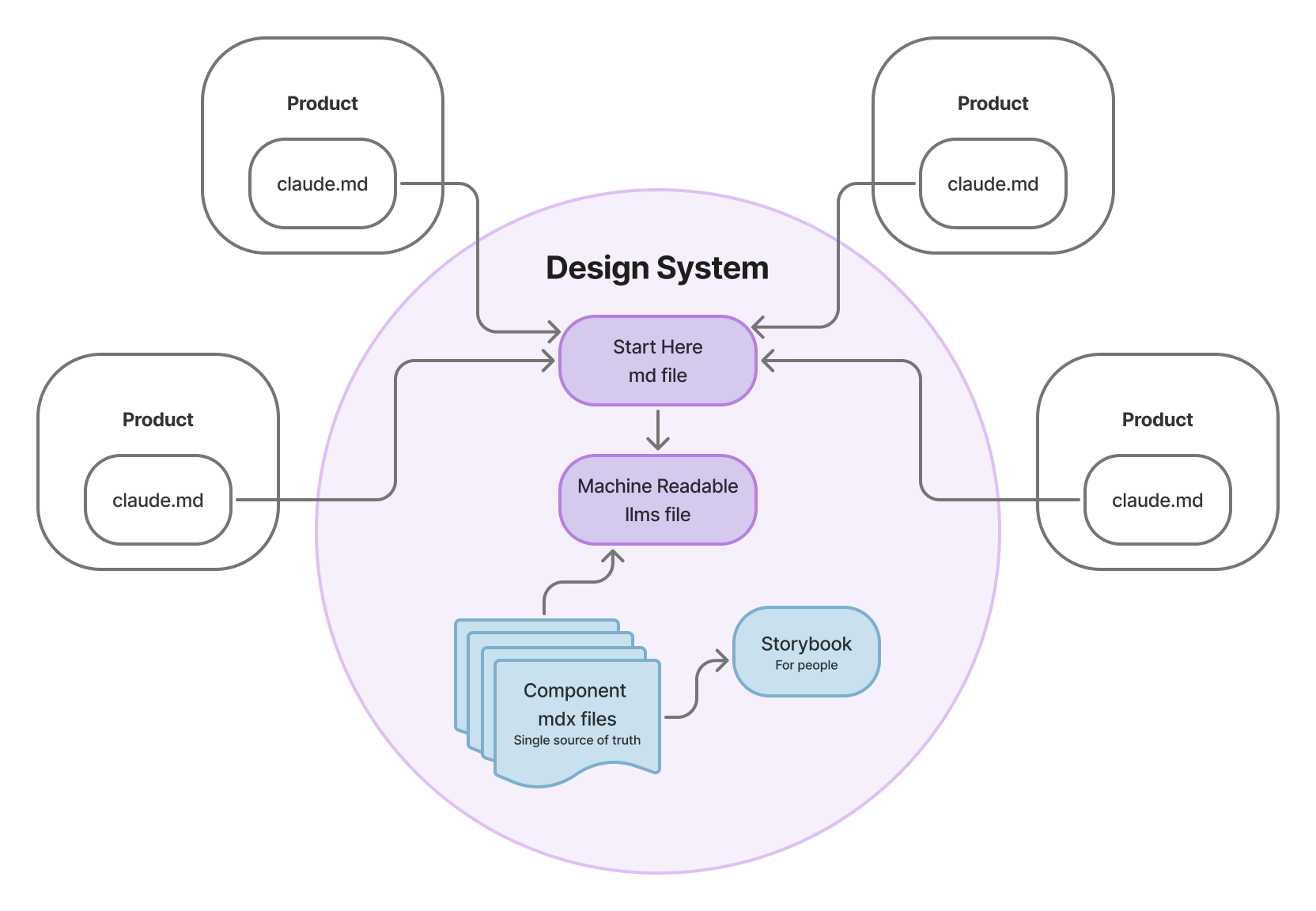
- There is a new “start here” markdown (md) file with instructions specifically for consuming Claudes. These are instructions not for people working on the design system, but for product teams that are using the design system. This md file includes general information like explaining to use the existing tokens and components instead of writing your own. It also includes specific rules like which color tokens to use for text. And it points to a few other documentation files in the code repo.
- All the front end repos have instructions in their own Claude markdown files that specifically point them to this one markdown file in the design system repo. This includes the designer's prototyping repos. This way, each consuming Claude knows exactly where to look for UI instructions every time. This also respects rule #2. Since all the repos are pointing to this one markdown file, we can update the rules in one place and everyone gets it.
- Every component in Storybook now has its own mdx file right next to the component's example stories. (Mdx is a type of markdown file that also includes dynamic JavaScript.) It has a specific format with set sections: Anatomy, When to Use, Do/Don't, and an optional Composition section for complicated components. This is a human readable file that is live in Storybook. When we push changes, these sections get automatically generated into a llms doc, which is specifically formatted to be machine readable. So you update a component's documentation in one place, and it gets formatted for humans and machines, respecting rules #1 and #2.
- In the component code itself, we can write rules for small implementation details in JSDoc comments. (JSDoc is a specific commenting syntax.) These comments are for consuming Claudes, and they are great for documenting little details that will be hard for people to remember. For example, in our table component, I added a little comment to use “-“ in a cell when there is no data available, instead of “N/A” or “No data.” Who wants to take up brain space to remember that? Put the burden of remembering stuff like this on Claude instead.
- There is now a spot in Storybook for general design system documentation. This includes general patterns, resource lists, and contribution docs. Including a contributor doc explaining all the above items I just told you about. Now the docs are all centralized in Storybook so everything is in one place.
I had Claude plan and generate all of this setup. The JSDoc comments and llms files weren't my idea. Claude did much of the heavy lifting, but we had a lot of back and forth discussing requirements, with Claude explaining the different options. I came out with a solid understanding of how to contribute to and maintain the documentation.
For the content, some of it I wrote myself, some of it was written by Claude, and some was a joint effort. For the mdx files for each component, I had Claude generate all of them, but then I went through every single one and made edits. Claude's first pass was important because it explained technical implementation details that I wouldn't have known to include. But I did a round of edits too because I had my own details to add, plus I wanted to make sure the documentation was accurate and human readable.
The goal of all these documentation updates is that the consuming Claudes now have better design system guardrails to operate under. They will take on more of the burden of remembering small design decisions and implementation details. The product designers and engineers will be able to focus more of their efforts on the big picture functionality of our software, while still getting the benefits, scalability, and consistency of the design system.
The Results
This was a big project for me, but I am very pleased that we are already seeing results just a few weeks after launching the changes.
- I reran the design system audit, and the machine readable score went from a 4/10 to an 8/10!
- I've heard anecdotally from a few designers and engineers that their Claudes are already outputting better results that are more in line with the design system!
- I just had a code contribution come through from an engineer on a consuming team. He added a small feature to an existing component, and included an update to the component's mdx documentation file. I asked him about it and he said that his Claude recommended the doc update as part of their planning phase. I was so thrilled to see my process actually working as intended.
This revamp of our documentation process was so empowering for me. I was able to harness Claude to make concrete and impactful improvements to our design system. By making the system more machine readable, I am setting it up to be a more integral part of our product process.